
CoDigital WebCessibility™
You’re Missing Up to 20% of Your Potential Customers If Your Website Isn’t Accessible.
- Millions of people rely on accessibility tools to browse the web, and if your website isn’t built to support them, they simply leave.
- 1 out of 5 people may not be able to browse your website in Canada, the USA and Europe.
- Globally, it's 1 out of 6!
- WebCessibility™ makes your website accessible, inclusive, and easier to use for everyone.
- It’s one of the most affordable ways to expand your reach, improve user experience, and strengthen your brand.

🌍 Why Website Accessibility Matters?
Business Growth.
Compliance.
Inclusion.
1. Business Growth: Accessibility Helps You Win More Customers
Accessible websites:
- Reach up to 20% more potential customers
- Build trust and credibility
- Improve user experience for everyone
- Reduce bounce rates
- Increase conversions
- Strengthen your brand
Even when not legally required, accessibility is a smart business decision that helps you stand out from competitors who ignore it.
or your pricing page so everything stays consistent and conversion‑focused
2. Compliance: Global Standards Are Getting Stricter
Canada, the U.S., and Europe are rapidly tightening digital accessibility rules.
Most regions now follow
WCAG 2.1 / 2.2 Level AA as the standard for accessible websites.
- Canada:
- The Accessible Canada Act (ACA) requires federal organizations and regulated industries to meet WCAG‑aligned standards.
- Ontario’s AODA requires accessibility for businesses with 50+ employees.
- Other provinces (MB, NS, BC) are introducing similar requirements.
- United States:
- Courts have ruled that websites fall under the Americans with Disabilities Act (ADA), requiring accessible digital experiences.
- European Union:
- The EU Web Accessibility Directive covers public sector websites.
- The European Accessibility Act (EAA) requires private‑sector services, including e‑commerce, banking, and transportation, to be accessible.
Regulations vary, but the direction is clear: accessibility is becoming a global expectation.
3. Inclusion: 1 in 5 People Rely on Accessibility Tools
Across North America and Europe:
- Millions have visual, motor, cognitive, or hearing disabilities
- Many rely on screen readers, keyboard navigation, captions, or high‑contrast modes
- If your website isn’t accessible, these users simply can’t engage
Accessibility isn’t just compliance; it’s about
serving real people and ensuring everyone can use your website.
Real Customers,
Real People,
Real Website Accessibility Challenges.
It is estimated that around 2.6 million Canadians suffer from “colour blindness”.
The Canadian Association of Optometrists (CAO) says that the term “colour blind” is actually used incorrectly, as only a very small percentage of people are completely unable to identify any colour (also known asachromatopsia)
Credit: TheSafetymag, Jul 25, 2022
Video Credit: Ted Talk
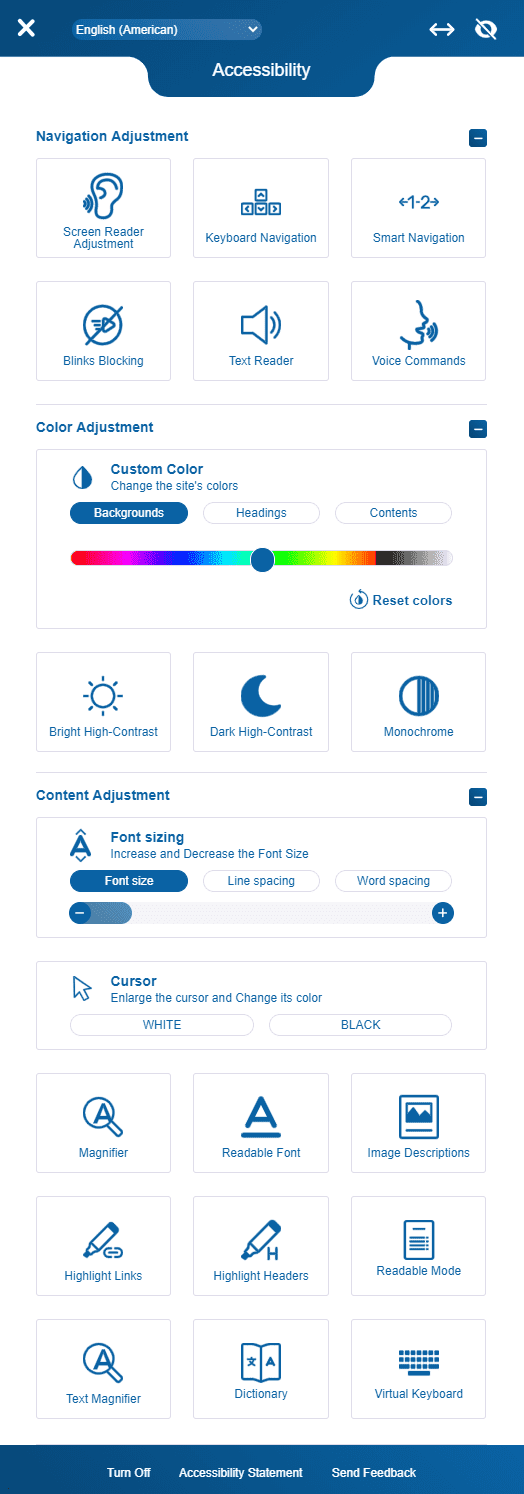
🔊 Key Accessibility Features
Text Reader
Supports users with reading challenges, visual impairments, or attention‑related conditions.
Visitors can control reading speed, pitch, and navigation.
Keyboard Navigation
Essential for users who cannot use a mouse.
Meets WCAG 2.0 standards and allows full site navigation using only a keyboard.
Blink Blocking
Protects users sensitive to flashing or animated content.
Removes auto‑play animations, marquees, and effects that may cause distraction or discomfort.
Contrast & Display Options
Includes monochrome, bright high contrast, and dark high contrast modes.
Helps users with low vision or colour blindness read content more easily.
Image Descriptions
Ensures non‑text content is accessible.
Supports screen readers and aligns with WCAG guidelines for alternative text.
Low‑Vision Tools
Includes large cursors, link highlighting, and header highlighting to improve navigation.
Accessibility Toolbar
Allows users to adjust font size, choose readable fonts, and customize their viewing experience.
WCAG‑Aligned Tools
Our accessibility suite aligns with WCAG 2.0 guidelines, helping your website meet modern accessibility expectations.
USA Case Study:
Nearly 20% of the US Internet users are disabled
A U.S. Census Bureau report indicates that nearly 51 million people in the US aged 15 and older are subject to a disability.
19.9 million face a difficult time lifting and grasping, which makes them unable to use mouse or keyboard; whereas 8.1 million face a visual disability; some use a screen reader or a screen magnifier, some are subject to color blindness.
The same report indicates that about 7.6 million people have a hearing disability; they rely on captions and/or transcripts for audio and video media.
By making your website's digital content accessible, your organization can reach out to more consumers, boost customer satisfaction rate, and stand out from the competitors, the ones who aren't ADA-compliant.
$1M Compliance Warranty
We offer numerous tiers of accessibility service.
From a simple one-line widget that'll improve your website accessibility to on-site accessibility and full-website audit, we will help you make your website ADA-compliant.
We believe in our top-class service so much that we offer a massive $1M Warranty if you get sued for not being accessible after deploying our website accessibility solution.
(Terms and Conditions Apply)

Text Reader Feature
With text reader, you can address users who face a hard time reading different textual content(s) and the ones with ADD (Attention Deficit Disorder).
With using text reader, the users hold the ability to with the help of a keyboard and/ or mouse. Plus, the user has complete control of the reading rate as well as sound pitch of the reader widget.
Keyboard Navigation
Many people with motor disabilities find it difficult to use a mouse; and visual impaired or blind users utilize keyboard navigation routinely.
The Keyboard Navigation function meets the standard WCAG 2.0 requirements and delivers complete accessibility, enabling the users to navigate through the pages with the help of keyboard itself.

Blinks Blocking
For the ones prone to caused by flickering, strobing, or flashing effects and users with learning disabilities, this feature has been built specially for you.
The Blinks Blocking tool eliminates any or all graphics, marquees, news-tickers, galleries, auto-play, and other animations which may result in distraction or lead to a photo-epileptic seizure.
Monochrome, Bright
High Contrast, Dark High Contrast
This tool provides 3 different contrast display options enabling the changing the background color and text such that users with visual disability can easily read it.
Image Descriptions
It's no secret that graphics and images make the content easier to read and understand. In accordance to the WCAG 2.0 guidelines, all non-textual content must have a text alternative, providing a similar meaning as the image.
Our image description tool follows the section 1.4.5 of the WCAG Success criterion to ensure that image info is being displayed effectively and the intended meaning or concept of the image is made clear to the everyone.
Different functionalities to improve usability for low-vision users include: a large black cursor, large white cursor, header highlighters and links.

Accessibility Toolbar & Additional Functions
Decrease Font Size, Increase Font Size, Readable Font.
With this tool, people with low visual impairments can easily increase or decrease the text size or select a basic, easily-readable, simple, font without compromising the functionality and readibility.

WCAG 2.0 level AAA solution
This suite of all packaged in one easy-to-install widget accessibility tools meets the WCAG 2.0 specified conformance level “Triple – A” guidelines.

Got questions?
Our experts would love to address them all.
Contact us TODAY!
Our experts will help your website become ADA-compliant, helping you serve the disabled users in a much efficient manner and avoid any lawsuits that may result in you having to pay heavy fines.
Contact one of your experts TODAY!

Our Experts are Ready to Help!
Connect with one of our Local Experts and discuss your requirements. Free advice.
Contact Us
Thank you for contacting us.
We will get back to you as soon as possible.
We will get back to you as soon as possible.
Oops, there was an error sending your message.
Please try again later.
Please try again later.

Want to connect with a
marketing expert? Dial in!
+1 548-386-4554
+1 943-238-0288
